Showing posts with label Inspired by Colors. Show all posts

Thursday, September 10, 2020

Inspired by the Big Photo Page with Marie H Designs


Hello everyone! It is Marie aka Marie H Designs and I am here with a new blog post that is part of my blog series “Inspired by”. Today it is “Inspired by the Big Photo Page”. What’s a Big Photo page ? Of course we can all have a different definition of what’s a big photo page but for me and for many in Digiland it is a page where the photo (or more) takes more than 50-60 % off your page. It sometimes means also to have fewer elements and journaling.


I love big photo pages and even if having a huge photo can be tricky it doesn’t mean that your layouts will all look the same.


For example in this layout you have the photo that takes more than half of the page. I loved the smile of my daughter in it and I didn’t want it to be small. You can see that there is plenty of room to add a wordart and clustering. 


Big photos pages are also very good to capture scenery, nature and the wildlife. In these 2 layouts, Linda and Betsy have created layouts using big photos.


Linda has used a mask for a stunning beach photo that she enhanced with clustering and paper shaped. Masks are great to give a little extra to your big photo that are not always perfect.


Betsy used 3 photos that envelop the layout almost entirely. Being that big makes us see the great blue heron perfectly and she even has added journaling. 


In both layouts the idea was to bring the eye to the main subject… the nature.


Big Photo layouts can also be used to create vintage page with photos that we cherish. Tammy has created this page from her grand dad. It takes up around 40-50 % of the page but she has stacked it with many papers and elements to enhance the vintage feeling to it. If you are like me and have lots of old photos to scrap this is a great way to make them memorable.


Sometimes we have too many photos we like to scrap of the same event, moments that it can be hard to decide what to use. For this last page I had decided to use one of the photos for the background and added smaller photos on one of the corners. It reduces the numbers of elements we use but I was able with a border to add a little clustering. This is one of my favorite layouts ever. 


As you can see you can use big photos in your layouts… and it is still makes gorgeous layouts. It gives you a new look to the way you want to use your photos.


Have you ever tried big photo layouts ? 


Have a wonderful time scrapping !


Sunday, July 12, 2020

Inspired by Photoless Pages with Marie H Designs


Hello everyone! It is Marie aka Marie H Designs and I am here with a new blog post that is part of my blog series “Inspired by” and today it is “Inspired by Photoless Pages”. Photoless? Yes sometimes it is fun and a great way to capture memories that we don’t have photos off. Scrapbooking is a way to remember moments, events, special things in our lives but it happens that sometimes we don’t have photos of it. Some people also like to use scrapbooking to create a page they will print with a motivational quote to hang in their home.

For example I wanted to capture a situation that we used to have in our old house. Some people don’t believe in it but we were actually living “unexplained” things in our home and I wanted to capture it. Of course it was impossible to take of photo of these so I have decided to create a layout without a photo but with lots of journaling.


Scrapbooking is often use to express our feelings and one of my CT had created a page that she would use on her PC as a motivational page in a special moment in her life.


For this next photoless layout Tammy wanted to use this quote that is really inspiring but didn’t want to use any photos. She framed thequote and created around it to make it the central focus of the page.


A few years ago after I gave birth to my second child, I had created a page that I still take a looked at from time to time. It is a page that was very emotional to make as I had finally realized after 20ish years that my mom was not a “bad” mom… but a mom that on the opposite loved me so much that she had to step her foot down to helped me.


As you can see, none of these pages could have been created with photos but still they are important pages. They are layouts that represent something important and are a good way of remembering them in the future.

Have you ever created a photoless layout? No? I really hope that you will all at least once try to create about something you don’t have photos off but still want to capture it.


Thursday, May 28, 2020

Inspired by the Pocket Layouts with Marie H Designs


Hello everyone! It is Marie aka Marie H Designs and I am here with a new blog post that is part of my blog series “Inspired by” and today it is “Inspired by Pocket layouts”. When we create a scrapbooking page it is to tell a story, capture a memory and show it to everyone. It is a combination of words, photos, colors… and pocket scrapbooking brings the best of all of these 3 elements.

Pocket scrapbooking started in 2008 in traditional scrapbooking when Becky Higgins created a kit called Project 365 that was focusing on the idea of a photo a day for a year, that we can still see around. Over time the digital scrapbooking went along with this idea. Being digital Pocket scrapbooking don’t have the physical limitations of the pocket and therefore we can ‘’play’’ around by adding elements, changing sizes.

You don’t have to use journaling cards (or pocket cards) when you created a pocket layout. Many people like the pocket scrapbooking style when we have many things to show or have a lot of photos for the same occasion.

As an example Tammy had a lot of photos from her grandaughter and to create this layout using Lush Lavender, she used lots of photos that she blocked all around using small elements to give the importance to these stunning photos.


A Pocket page can be perfect to capture a place you visited. We often take lots of photos when we go on vacations and pocket pages are a good way to keep this moment special. You can add not only a lot of photos but you can vary the size with very small, medium and big photos like in the page from Betsy that she created using Anchors Away for her visit to St. Augustine Lighthouse.


You can use pocket scrapbooking to create a page about someone (this is my favorite way of using it) in many occasions. Like a retrospective for a birthday or simply to show funny, touching moments of someone. Like Becky used Boy Oh Boy to create this wonderful page about her grandson. In this layout you see different moments of him and she adds a little bit of journaling to create a fun layout he will for sure like to see when he grows up.


As you can see Pocket Scrapbooking is not only a different style of scrapbooking but it can help to add more photos, just like a comic book.

Did you try to pocket scrapbook? Do you like it? Have you seen the many products offered at My Memories from many designers?

Sunday, February 23, 2020

Inspired by the Numbers with Marie H Designs

https://www.mymemoriesblog.com/search/label/Inspired%20by%20Colors 

Hello everyone! It is Marie aka Marie H Designs and I am here with a new blog post that is part of my blog series “Inspired by” and today it is “Inspired by the Numbers”. When we create a scrapbooking page it is to tell a story, capture a memory and show it to everyone. It is a combination of words, photos, colors… but how about telling a story with numbers.

We are surrounded by numbers; the time, dates, age, measures, so why not playing with these numbers and add them in our scrapbook layout.

You can add it into your title to mark a milestone, to enhance a birthday and you can also add details to your layout with the same number to give it more weight.

This layout by Tammy is a good example of using numbers many times in her layout to tell the story of her layout.


You can use it in your title also instead of words to give more strength to it. In this layout by myself I used the number “3” instead of the word to attract it to the photo. This was the first photo of my 3 daughters together after my little one was born and the number 3 became a reality and I wanted to point it out. So I made the number very big on a corner with the rest of the words to attract the eye on the photo.


This is a special layout for my daughter who is struggling in school due to her dyslexia and she was so happy to be finally in 3rd grade.


We are surrounded by numbers and it can be a good idea to use them in our layouts to tell a story, to enhance your photos. You can use monogram numbers but you can always make your own with papers, crop elements and ephemera that has numbers in it to create new elements… the possibilities are endless.


So how are you inspired by numbers? Do you have a number you like to scrap more than others? For myself, I realized that I tend to use the number 3 a lot.


Sunday, November 17, 2019

Inspired by the Words with Marie H Designs


Hello everyone! It is Marie aka Marie H Designs and I am here with a new blog post that is part of my blog series “Inspired by” and today it is “Inspired by the Words”. By words I do not mean the journaling but be inspired by quotes, lyrics that we come across and that can be a big inspiration to help you create layouts.

I am a person who even if English is not my main language like to see (or read) quotes that inspires me. Google is a good friend for this for me as well as Pinterest and I can spend too much time just to watch quotes, layouts with them in it.

I am lucky to have many creative members who are pros in this and that LOVE to use quotes in their layouts. Sometimes we have photos that we adore but we just don’t find the words for it and quotes, lyrics are perfect for it.

In this layout, my CT Lou added to this gorgeous autumn photo a touching quote about changes.


Sometimes we can use a quote to create a eye catching title like in this layout where my CT Becki  created her title with the alpha and marking.


A layout with a powerful quote add something special to a layout. It gives strength to your photo and the message you want to share with your layout. In this layout I have added with the photo of my children a quote that I tell them A LOT.


Do you have a special quote you like to use in your layout? Do you have one that you would like to use? While looking around for this blog post I came across one that will definitely be in one of my next layout.

The best and most beautiful things in the world cannot be seen or even touched - they must be felt with the heart.” Helen Keller

Sunday, June 9, 2019

Insipred by the Not so Good Photos with Marie H Designs

https://www.mymemoriesblog.com/search/label/Inspired%20by%20Colors 

Hi! I am Marie from Marie H Designs and I am here with a new blog post that I called
“Inspired by the Not so Good Photos”. I am sure I am not the only one that gets LOTS of
these not so good photos and sometimes they are the only ones we have to capture an
event or a special moment.

In my early digi days I used to avoid to scrap these but as the years passed I started to
use them and if they are too bad to compensate with journaling. Having bad photos, to
me, it is part of my family with 3 very active girls.

There are a few ways you can play with your photos to have the most of it. Of course
you can always try to “fix” them but sometimes it is not possible.

How to create layouts with the Not so good photos you have?
  • You can crop your photo to have only one main focus and remove what's not so good.
  • You can size down your photos to make them smaller so the blurriness & fuzziness will show less.
  • If it's the colors that are way off you can always turn them black and white or sepia.
  • You can add stickers or writing ON the photos.
  • You can add lots of journaling or journaling cards to write down the moment. 
OR simply enjoy your photos and scrap them with a sense of humor.

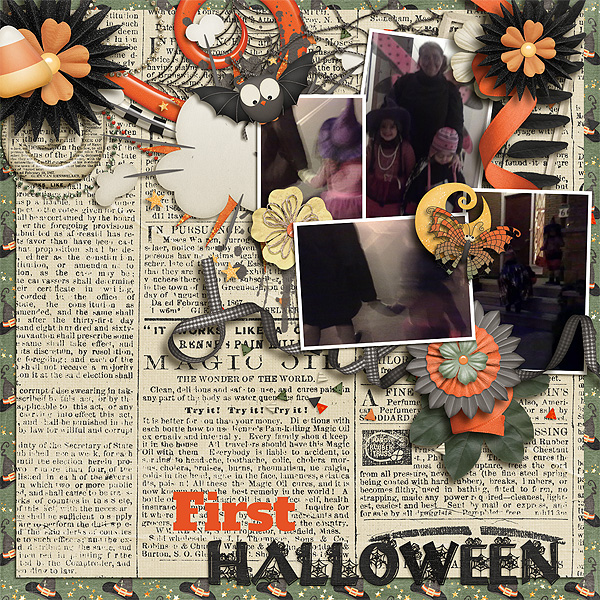
To show you 2 examples of layouts here is a first one that I have created with my oldest
daughters first Halloween. We had forgotten to bring our camera and only had our
cellphones camera and let’s face it in 2010 the quality was not what it is now. So we
have blurry and very dark photos.

As you can see I have decided to clustered them together with lots of elements that
shows the Halloween theme but decided to embrace my photos as they are. I managed
to make them less dark but I had to size them down because on full size it was almost
impossible to see.

I used Boo-tiful Halloween for this layout:

https://www.mymemories.com/store/display_product_page?id=MHMH-CP-1710-133070 

For that second layout I have used Get Well Soon collection. I had taken photos of our
last visit to the doctor (3 in 5 days) but even my daughter was very sick she was moving
around so much that I was never able to get a “good” photo. I did a pocket journaling
type of layout for the photos and was able to add many journaling, cards to add to the
photos. So even if the photos are not so good I really like that page.

https://www.mymemories.com/store/product_search?term=get+well+marieh

Do you like to scrap your not so good photos? What are your tips and tricks?

I want to see your layouts and you are welcome to join me in my monthly challenge in
the My Memories Forum HERE.

Thursday, May 23, 2019

Inspired by Colors with Marie H Designs

https://www.mymemoriesblog.com/search/label/Inspired%20by%20Colors

Hi ! I am Marie from Marie H Designs and I am here with a new “Inspired by Colors”
blog post.

In this blog I want to talk to you about special kits that, instead of having multiple
colors, have usually one color in different shades: the monochrome kits.

The Monochrome kit contains one color from light to dark and it most cases you will
have neutrals like black and white. You can also find some variant with a Blue kit that
would have 2-3 different blue (baby, royal and navy) with the sades and neutral.

These monochrome kits are so useful when you want to either showcase an emotion 
(see my previous post HERE) or to make the photo stand out.

 I have created a small series of monochromatic kits that spotlight one color and that
makes the layouts stand out. In all these kits you will find one dominant color with
different shades of it, black and white. Each of these can help you to bring the color of 
something in your photo or on the opposite do a contrast and show an emotion.

As you can see in this layout. I used Overjoyed Orange as it was matching the suit my
daughter was wearing.   

https://www.mymemories.com/store/display_product_page?id=MHMH-CP-1810-150583 https://www.mymemories.com/store/display_product_page?id=MHMH-CP-1810-150583

In this one, Lou has created a color layout with Youthful Yellow that matches the
flowers in the photo and made it very cheerful.


https://www.mymemories.com/store/display_product_page?id=MHMH-CP-1802-139147 https://www.mymemories.com/store/display_product_page?id=MHMH-CP-1802-139147


I have created Gracefuly Grey because I had a hard time finding kits for specific photos
that had way to many colors in it. I used it for this sweet layout of 2 of my daughters
and as it had many colors I wanted to tone it down a bit and get the attention on the
photo.


https://www.mymemories.com/store/display_product_page?id=MHMH-CP-1801-137055 https://www.mymemories.com/store/display_product_page?id=MHMH-CP-1801-137055

If you want to request a specific color for a monochrome kit I would like to hear from 
you. I want to continue to create some and would like some ideas.

I want to see your layouts and you are welcome to join me in my monthly challenge in
the My Memories Forum HERE.