Showing posts with label Sunshine Inspired Designs. Show all posts

Wednesday, April 19, 2017

Sunshine Inspired Designs Tip


Hi there, I'm Ania, the designer behind Sunshine Inspired Designs. And I'm here to share with you my favorite scrapbooking tips.

Big Photos as Your Background

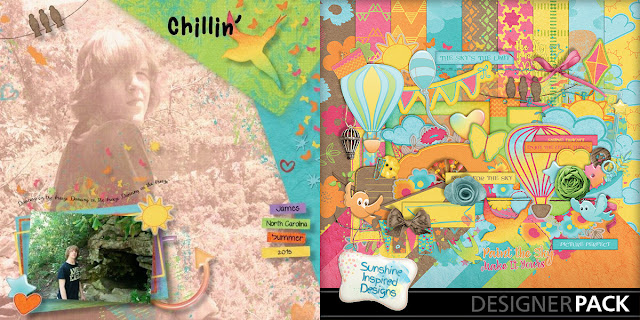
I’m a fan of including big photos into my layouts. They really draw attention and focus to your layout, but they also work really well as part of the background.
Here are 3 ways to use your big photos on the layout:
1. Use your photo as a background. You can use blend modes or leave it as it is. Here are a few examples from Sunshine Inspired Designs Team. 
www.mymemories.com/store/product_search?term=Color+Me+Happy+SID

2. Use masks to blend your big photo with the background. Check out examples from the team.


www.mymemories.com/store/product_search?term=Bohemian+GIrl+SID 

www.mymemories.com/store/product_search?term=Funny+bunny+SID


3. Add a border on one side of the photo. 


www.mymemories.com/store/product_search?term=Falling+For+Fall+SID

www.mymemories.com/store/product_search?term=This+year+SID


Now that you read all these fun ideas join me in the Sunshine Inspired Challenge in the forum and create a layout using one of these techniques and a kit from Sunshine Inspired Designs. Everyone who posts their layout by the due date will receive a product of their choice from SID's store up to $3 value.


Now that you read all these fun ideas join me in the Sunshine Inspired Challenge in the forum and create a layout using one of these techniques and a kit from Sunshine Inspired Designs. Everyone who posts their layout by the due date will receive a product of their choice from SID's store up to $3 value.
https://forums.mymemories.com/?forum=552743

Friday, February 10, 2017

Designer Tip with Sunshine Inspired Designs


Sunshine Inspired Tip

Hi there, I'm Ania, the designer behind Sunshine Inspired Designs. And I'm here to share with you my favorite scrapbooking tips.

Use the same photo multiple times on your layout. 

Recently I talked with Kathleen, SID’s Creative Team Member about using the same photo multiple times on a layout. Sometimes you just have one photo that you love and want to emphasize it in your layout. But using it ones doesn’t give it the justice and you know using the same photo multiple times through the layout will make it pop. This technique is also used as a powerful design style in creating pages. 

This topic inspired me to share with you three of my favorite techniques you can use to incorporate your photo using one of these design tips on your layout.

Tip 1. Use it as a background in black and white - One of my favorite ways to incorporate the same image on a layout is using it on the background layer in black and white so it doesn't take away the attention from the main colored version of the image. Your background layer can be black and white, can be sepia, you can also blend it with your background paper using blending modes and changing the opacity. 


Tip 2. Use different post processing techniques - To give your photo more powerful effect, you can use different post processing techniques which will give your layout the impact you are looking for. If you are just starting out your journey with photo edits start with basic color version, black and white and/or sepia tones but remember that the possibilities are endless. Using this technique draws attention to the scrapbooker’s/artist’s varying takes on a single photo on a layout. 


Tip 3. Use different crops of the same image - This technique is also perfect when you want to emphasize the story you are telling. By cropping your photo, you are bringing the focus to the moment in life or a loved one you want to chronicle on your page.


Here is my take on this tip: Some of you may know that I love minimalistic style layouts and the example above is perfect to show you that this technique can be used in this style as well. Using multiple photos doesn’t mean you need to have a busy layout if that is not your style.

Now that you read all these fun ideas join me in the Sunshine Inspired Challenge in the forum and create a layout using one of these techniques and a kit from Sunshine Inspired Designs. Everyone who post their layout by the due date will receive a product of your choice from SID's store up to $3 value. 

Thursday, February 9, 2017

Designer Tip by Sunshine Inspired Designs


Hi there, I'm Ania, the designer behind Sunshine Inspired Designs. And I'm here to share with you my favorite scrapbooking tips.


Give your letters dimension!

Sometimes when I work on my layouts I find that the journaling or the page title doesn’t stand out. It’s missing depth, missing dimension. I’m not talking about the content of the journaling or the title. I’m talking about the look of it, how it fits on the layout, or if it grabs the viewers attention. When using an alpha set the easiest way to add dimension is to use shadows. Most of the time it is enough, but when using fonts it is a totally different story.

Sometimes the font you chose – although it has the perfect look and matches the style of the layout – is still missing something. It just looks flat. Sometimes it is just a matter of recoloring. But there are days when you just know the color is perfect, but it still doesn’t look right. In that case, I always like to play around and see what works.

My three favorite techniques are:

1. 3D look - Duplicate your text layer, move your new layer underneath your main text layer, then moving the lower layer few pixels diagonally to add more of a 3D look. Using black or white on the bottom layer will definitely make your text stand out, but don’t limit yourself to those two colors. Experiment and have fun with it.


2. Add a stroke - Another way to make your letters stand out is to add a stroke (outline) to your text. It is very easy to do and can make a big difference. I use this technique when the font or alpha is too thin and hard to read. Play around with colors and choose one that works best for you.


3. Use styles - Nowadays, there are so many amazing styles out there that will add that special touch to your lettering. You may have to look for them in the Commercial Use section but it's worth it. 


Now that you read all these fun ideas join me in the Sunshine Inspired Challenge in the forum and create a layout using one of these techniques and a kit from Sunshine Inspired Designs. Everyone who post their layout by the due date will receive a product of your choice from SID's store up to $3 value. 


Tuesday, February 7, 2017

Designer Tip from Sunshine Inspired Designs


Hi there, I'm Ania, the designer behind Sunshine Inspired Designs. And I'm here to share with you my favorite scrapbooking tips.

Remember that every layout doesn’t have to be a Masterpiece.


From my own experience, I know that we tend to stress out when our layouts are not perfect, and the best thing at that moment is to just breath and remember that the number one priority is joy. Joy experienced when creating the page and joy of the person looking at your layout. 

Trying to create a masterpiece when scrapbooking your photos may be daunting and discouraging especially when you work on a multiple pages in one evening. It is a hard work to create more than one layout in a few hours. When this happens you may feel overwhelmed. Remember that sometimes you have to let go of that feeling and stop where you are because the quality of a layout does not always increase with the time spent on it.

There is no law in the code of scrapbooking that calls for sentencing you to death if you do not use a flower on each page. You are in control, you are the law and the law wins here. Are you happy while you are making the page? Are you happy when you look at the page once it is finished? Well then good on ya: You have just created a masterpiece.

Now that you read all these fun ideas join me in the Sunshine Inspired Challenge in the forum and create a layout using one of these techniques and a kit from Sunshine Inspired Designs. Everyone who post their layout by the due date will receive a product of your choice from SID's store up to $3 value. 

Look at some of my layouts that I felt like there are still missing something but it didn't matter at the end. What matters is that I'm proud of them and they make me happy every time I look at them. 


--

Have a spectacular day, 


Ania Archer